Short answer: answer tools get facts about businesses wrong when their sources disagree, when information online is outdated or when they fill gaps with guesses. To correct the record, find out what the tool is saying, trace the wrong detail back to its likely source, such as an old directory listing, your Google profile or your own website, fix it at the source, make your correct details consistent everywhere and use the tool’s feedback option where available. Corrections usually take time to appear.
Imagine a potential customer asking an answer assistant about your business and being told you are closed on weekends when you are not, that you do not serve their town when you do or that your phone number is one you stopped using years ago. It happens more often than many owners realize. answer tools are useful, but they can repeat outdated information or combine sources in ways that produce errors.
You cannot directly edit what an answer tool says. You can, however, influence the information it relies on. This guide explains why errors happen and the practical steps that help correct them over time.
Why answer tools get business facts wrong
Conflicting sources
If your website lists one phone number and three directories list another, an answer tool may pick the wrong one or mention both.
Outdated information
Old listings, archived pages and stale articles can linger online for years. answer tools may draw on them.
Gaps filled with guesses
When information is missing, some answer tools may generate a plausible sounding answer that is not accurate. This is sometimes called a hallucination.
Similar business names
Businesses with similar names, especially in nearby areas, can be confused with each other.
Training data that lags behind
Some answer models were trained on data collected at an earlier point and may not reflect recent changes unless they search the web for current information.
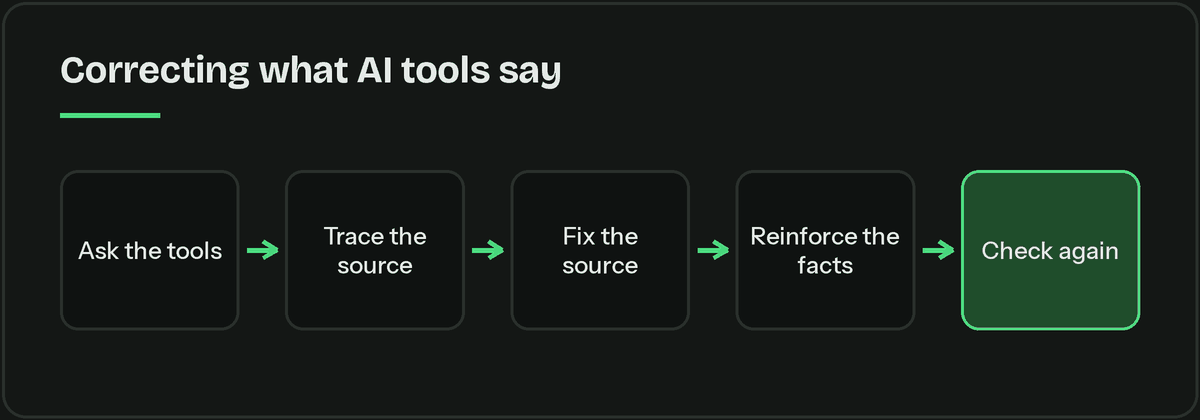
Step one: find out what the tools are saying
Ask several answer tools the questions customers might ask, such as what your hours are, where you are located, what services you offer and whether you serve a particular area. Try ChatGPT, Google’s ChatGPT features, Gemini, Microsoft Copilot and Perplexity. Note what is wrong and, where tools show sources, which pages they cite.
Step two: trace the source
Wrong details almost always come from somewhere. Common sources include the following.
- Your own website, including old pages, footers or structured data.
- Your Google Business Profile, Apple Business Connect or Bing Places listing.
- Directory listings you created long ago or never claimed.
- Social profiles with outdated information.
- Articles or press mentions with old details.
Search for the wrong detail, such as an old phone number in quotation marks, to find where it appears.
Step three: fix it at the source
- Edit your website so every page shows correct information.
- Correct your Google, Apple and Bing listings.
- Claim and correct directory listings, or use their suggest an edit options.
- Contact publishers of articles with significant errors and politely request a correction.
- Remove or redirect outdated pages on your own site.
Our guide to local citation building explains how to find and manage listings.
Step four: reinforce correct information
Make your website the clearest source
Put your key facts, such as services, service areas, hours and contact details, in clear, visible text on your website. An about page and a contact page that state these facts plainly help.
Add accurate structured data
LocalBusiness markup that matches your visible content and your profiles supports clarity.
Keep everything consistent
Consistency across many sources makes correct information more likely to win out.
Step five: use feedback options
Many answer tools let users rate or report responses. Use these options to flag errors about your business, noting what is wrong and what is correct. This does not guarantee a quick change, but it gives the provider useful signals.
Be patient and check again
answer tools update at different speeds. Tools that search the web may reflect corrections once the sources are recrawled. Tools relying on older training data may take longer. Recheck every few weeks and keep fixing any remaining sources.
Preventing future errors
- Change your details everywhere at once when anything changes.
- Review your main listings a few times a year.
- Keep old pages redirected rather than leaving outdated content live.
- Earn reviews and mentions that describe your business accurately.
When errors are serious
If an answer tool repeats something harmful or clearly false about your business, document it with screenshots and dates, report it through the tool’s official feedback channels and fix any underlying sources. For serious reputational issues, consider professional advice.
Our guide on getting recommended by ChatGPT covers the foundations that help answer tools describe businesses accurately. If you want help auditing and correcting your information, our search answer optimization services include it.
Frequently asked questions
Can we contact ChatGPT companies to correct our business details?
Most answer tools offer feedback options rather than direct editing. The most reliable approach is to fix the sources the tools draw on.
How long does it take for answer tools to reflect corrections?
It varies by tool. Some update as soon as sources are recrawled, while others take longer.
Why does one answer tool get it right and another get it wrong?
Different tools use different sources, search methods and training data. That is why consistency across many sources matters.
Next step
Want to know what answer tools are saying about your business? Request a free audit and we will check key tools and trace any errors to their sources.
Work with a local team: Spokane SEO, Spokane Valley SEO and a free SEO audit from an SEO company in Spokane.