Short answer: If your Google Business Profile is suspended, first figure out what kind of suspension it is. A soft suspension usually leaves the profile visible but stops you from managing it, while a hard suspension removes it from Maps and search. Review Google’s guidelines, fix anything on the profile that breaks them, such as keyword stuffed names or an ineligible address, gather proof that your business is real and request reinstatement through Google’s official form. Do not create a new profile while you wait.
Few things worry a local business owner more than discovering their Google profile has stopped working. Calls slow down, reviews seem to vanish and the business is suddenly hard to find. Suspensions can happen to legitimate businesses, sometimes because of a guideline issue the owner did not know about, sometimes because of an automated check triggered by an edit.
The good news is that most legitimate businesses can get reinstated by following the right process calmly. This guide explains what suspensions are, why they happen and what to do.
Types of suspensions
Soft suspension
With a soft suspension, your profile usually still appears in search and Maps, but you lose the ability to manage it. You might see a message in your account that the profile is suspended or that it needs verification. Reviews and information remain visible to the public.
Hard suspension
With a hard suspension, the profile disappears from Google Maps and search entirely, and reviews are no longer visible. This usually indicates Google believes the business or the listing is ineligible or violates guidelines.
Common reasons for suspension
- Keyword stuffed business name. Adding services, cities or slogans to your name that are not part of your real business name.
- Ineligible address. Using a virtual office, coworking desk, mailbox service or an address where you do not actually operate.
- Showing an address when you should not. Service area businesses that do not serve customers at their location should hide the address.
- Multiple profiles for one business. Creating separate profiles for each service or each city you serve from one location.
- Business type not eligible. Online only businesses and some types of operations are not eligible for profiles.
- Suspicious edits. Changing the name, address or category several times in a short period can trigger an automated review.
- Linked accounts. If a manager or owner account is connected to other problematic profiles, it can affect yours.
What to do first
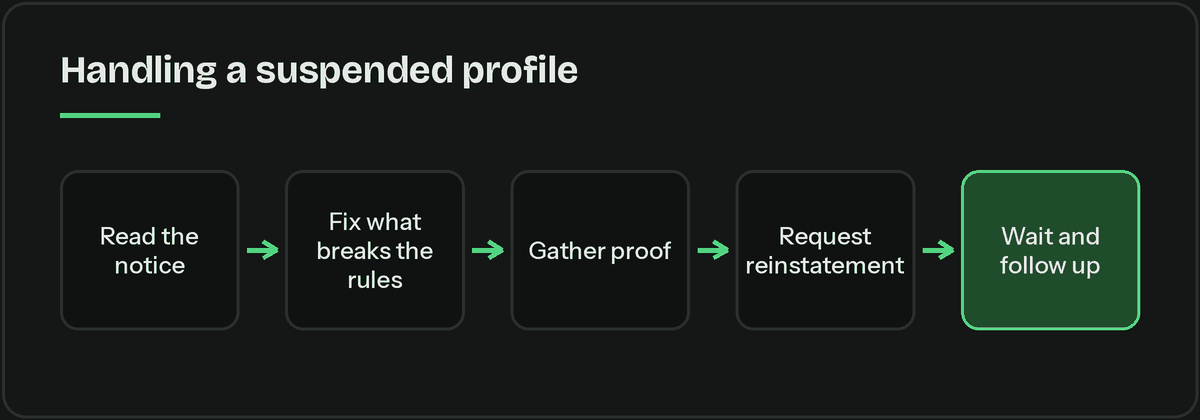
Do not panic or make rapid changes
Making many changes in quick succession can make things worse. Take time to understand the issue before you edit anything.
Read the message from Google
Check your Business Profile dashboard and email for any notice explaining the issue. Sometimes Google gives a specific reason.
Review the guidelines
Read Google’s guidelines for representing your business on Google. Compare them against your profile honestly. Look at your name, address, categories, service areas, website link and phone number.
Fix clear violations
If your name includes keywords, change it to your real name. If your address is a virtual office or mailbox, that location is not eligible. If you serve customers at their location, hide the address and set service areas instead.
Gathering evidence
Google may ask you to prove your business is real and operates where you say. Prepare documents before you submit a reinstatement request.
- A business license or registration showing your business name and address.
- A utility bill or lease in the business name at that address.
- Photos of your permanent signage, storefront or vehicle branding if relevant.
- A link to your website showing the same name, address and phone number.
Make sure the documents match the name and address on your profile exactly.
Requesting reinstatement
Google provides an official reinstatement request form, accessible from the Business Profile help center or from the notice in your dashboard. Fill it in carefully and honestly, upload your evidence and submit it once. Submitting repeated requests or creating a new profile can slow things down or cause further problems.
After submitting, watch your email for a response. Reviews of reinstatement requests can take some time. If the request is denied, you can usually appeal with additional evidence.
After reinstatement
- Keep your name, address and categories stable and accurate.
- Avoid frequent edits to core details.
- Make sure every manager on the profile is someone you trust.
- Keep your website and other listings consistent with the profile.
Our guide to Google Business Profile optimization covers how to keep a profile strong and within the rules. If your profile has a complicated history, our local SEO services can help review it and plan a clean path forward.
Frequently asked questions
Will our reviews come back after reinstatement?
In most cases, yes. Reinstated profiles usually recover their reviews and history, though it can take a little time for everything to reappear.
Should we create a new profile while ours is suspended?
No. Creating a new profile can look like an attempt to get around the suspension and may complicate reinstatement. Work through the official process instead.
Can a competitor get our profile suspended?
Anyone can suggest edits or report a listing, but Google reviews reports against its guidelines. A profile that follows the rules and has strong evidence of a real business is far less vulnerable.
Next step
Worried that something on your profile could put it at risk? Request a free audit and we will review your Google Business Profile against the guidelines.
Work with a local team: Spokane SEO, Spokane Valley SEO and a free SEO audit from an SEO company in Spokane.