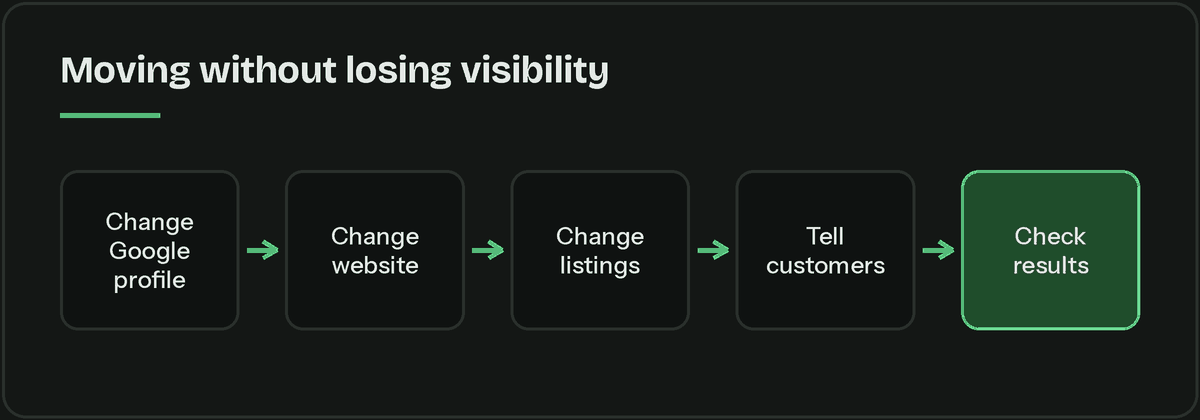
Short answer: When you move your business, change your address on your Google Business Profile first, keeping the same profile rather than creating a new one, so you keep your reviews and history. Then change your website, Apple Business Connect, Bing Places, social profiles and directories. Keep your business name and phone number the same if you can, expect a short period of adjustment in rankings and watch for old listings that still show the previous address.
Moving to a new office or shop is a big step, and there is plenty to manage without worrying about search. But your address is one of the most important pieces of information about your business online. If it is wrong, customers end up at the old location, and search engines may be unsure where you are.
This guide explains how to change your address online in the right order, so customers and search engines follow you to the new location.
Before the move
Confirm the new location is eligible
If customers will visit the new address, it needs to be a real location with signage where you operate during your hours. Virtual offices and mailbox services are not eligible for Google Business Profiles.
Make a list of every listing
Gather a list of everywhere your address appears: your website, Google, Apple, Bing, Facebook, industry directories, review sites, chambers of commerce and associations, invoices and email signatures. Our guide to local citation building explains how to find listings you may have forgotten.
Plan your timing
Change your public address when you actually move, not weeks before. If customers visit you, sending them to an empty building is worse than a short delay.
Changing your Google Business Profile
Edit the existing profile
Edit the address on your current profile rather than creating a new one. Your reviews, photos and history stay with the profile. Creating a new profile and abandoning the old one loses that history and can cause duplicate listing problems.
Expect reverification
Google may ask you to verify the new address. Follow the steps it offers. Until verification is complete, the change may not appear publicly.
Check the map pin
Make sure the pin sits on the correct building and entrance at the new address.
Service area businesses
If you hide your address because you serve customers at their locations, you still need to change it, since it affects where Google considers you based. Review your service areas at the same time.
Changing your website
- Change the address in your footer, contact page and anywhere else it appears.
- Change your LocalBusiness structured data.
- Change any embedded map.
- If you have a location page, refresh the directions, parking details and photos.
- Consider adding a short note that you have moved, with the new address, for returning customers.
Changing other major platforms
- Apple Business Connect, which controls Apple Maps and Siri.
- Bing Places for Business.
- Facebook and other social profiles.
- Industry specific directories and review sites.
- Local organizations and associations where you are listed.
Work from the most important listings to the least. Many smaller directories pull data from larger sources, so they may catch up over time.
What about rankings?
A move changes your distance from searchers, which is one of the main factors in map rankings. If you moved across town, you may rank better near the new location and less well near the old one. This is normal and reflects where you now operate.
Rankings can also fluctuate briefly while Google processes the change. Keeping your business name and phone number consistent helps search engines connect the old and new information.
Keeping your phone number
If possible, keep your existing phone number. A consistent number across listings is one of the strongest links between your old and new details. If you must change numbers, forward the old one to the new one for as long as you can.
After the move
- Search Google, Apple Maps and Bing for your business and confirm the new address shows correctly.
- Search for your old address in quotation marks to find listings you missed.
- Check your Google profile for suggested edits that might revert the change.
- Let regular customers know about the move by email or text.
- Ask new customers how they found you to make sure directions are working.
A short checklist
- Confirm the new location is eligible.
- List every place your address appears.
- Edit, do not replace, your Google profile.
- Change your website, schema and maps.
- Change Apple, Bing, social profiles and directories.
- Keep your phone number consistent.
- Search for old listings after the move.
If you would rather have someone handle the listing changes, our local SEO services include address change management across the platforms that matter.
Frequently asked questions
Will we lose our reviews if we move?
Not if you edit the address on your existing Google profile. Reviews stay with the profile.
Should we create a new profile for the new location?
Only if you are opening an additional location while keeping the old one. For a move, edit the existing profile.
How long until old listings are corrected?
Major platforms often reflect changes within days. Smaller directories can take longer, which is why searching for your old address afterward is worthwhile.
Next step
Planning a move and want to make sure customers can find you? Request a free audit and we will review your listings before and after the change.
Work with a local team: Spokane SEO, Spokane Valley SEO and a free SEO audit from an SEO company in Spokane.