Short answer: A thank you page is the page visitors see after submitting a form or booking. It should confirm the submission went through, explain what happens next and when, give a phone number for urgent needs and offer a helpful next step, such as a preparation guide or your project gallery. A dedicated thank you page also makes lead tracking more reliable, because each visit to it can be counted as a completed form. Keep it out of search results with noindex.
When someone fills out your contact or quote form, they have just made a small leap of faith. They have given you their name and phone number and are waiting to see what happens. Many websites respond with a tiny line of text that says thanks, or worse, nothing obvious at all. Visitors are left wondering whether it worked, and some submit again or call to check.
A good thank you page turns that uncertain moment into reassurance. It also gives you a reliable way to measure how many leads your website produces.
Why a dedicated thank you page matters
Reassurance for the customer
A clear confirmation tells the visitor their message arrived. Explaining what happens next, and when, reduces anxiety and repeat submissions.
Setting expectations
If you will call within a certain time, say so, but only promise what you can deliver. If you need photos or more details, explain how to send them.
Reliable tracking
When every successful form submission leads to the same thank you page, analytics tools can count visits to that page as leads. This is often more reliable than other tracking methods, especially after site changes. Our guide on how to track website leads covers how to set this up.
A chance to help further
The visitor is engaged. You can point them to genuinely useful content while they wait.
What to include on a thank you page
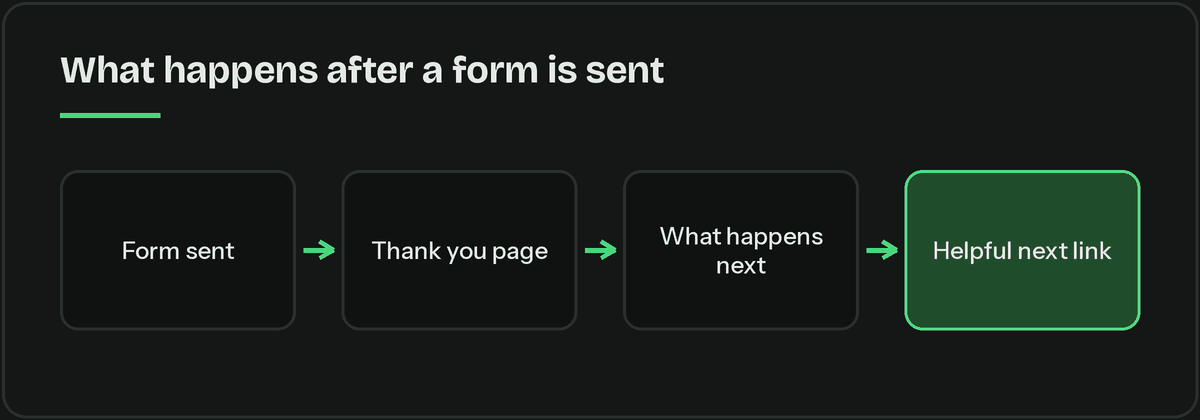
A clear confirmation
A headline such as thanks, we received your request, followed by a short sentence confirming what they submitted.
What happens next
Explain the next steps in plain words, such as when to expect a call, who will contact them and what that conversation covers.
A phone number for urgent needs
Some customers have time sensitive problems. Give them a way to call right away.
Helpful next steps
- A guide on how to prepare for your visit.
- Your project gallery or relevant case studies.
- Answers to common questions.
- Your Google reviews, so they feel confident in their choice.
Keep it to one or two suggestions so the page stays focused.
Your regular navigation
Visitors should still be able to move around the site easily.
What to avoid
- A tiny inline message that is easy to miss.
- A generic page with no information about next steps.
- Promises you cannot keep, such as a callback time you often miss.
- Pushing a hard sell immediately after someone has already reached out.
- Letting the page appear in search results, where visitors who never submitted a form could land on it and skew your tracking.
Technical setup
Redirect after submission
Most form plugins let you choose between showing a message on the same page and redirecting to another page. Choose the redirect option and select your thank you page.
Separate pages for different forms
If you have different forms, such as a quote request and a careers application, use separate thank you pages so you can track them separately.
Noindex
Set the thank you page to noindex in your SEO plugin so it stays out of search results. Do not block it in robots.txt, or search engines cannot see the noindex instruction.
Track it as a key event
In Google Analytics, set up a key event that fires when someone views the thank you page. Then you can see which pages and channels lead to form submissions.
Check the whole journey
Submit your own forms regularly. Confirm you land on the thank you page, the message arrives in the right inbox and the analytics key event records. Form problems often appear after plugin changes and can go unnoticed for weeks.
Follow through after the page
A thank you page makes a promise, so the rest of your process has to keep it. If the page says someone will call within a business day, make sure inquiries are routed to someone who checks them and calls back on time. Consider sending a short automatic email confirming the request as well, especially if the visitor might not remember the page later. The page reassures, but the follow up is what turns a form into a customer.
Beyond forms
The same idea applies to online bookings, newsletter signups and downloads. Any time a visitor completes an action, a clear confirmation page helps them and helps you measure results.
If you want forms, thank you pages and tracking set up properly, our website development services include lead tracking as part of every build. Our article on why a website is not generating leads covers related problems to check.
Frequently asked questions
Do thank you pages help SEO?
Not directly, and they should be kept out of search results. Their value is in reassuring customers and making lead tracking reliable.
Should we include a special offer on the thank you page?
Only if it genuinely helps the customer. The main goal is reassurance and clear next steps, not another sales pitch.
What if our form plugin does not support redirects?
Most popular form plugins do. If yours does not, consider switching to one that does, or use the plugin’s confirmation event for tracking.
Next step
Not sure whether your forms are working and being tracked? Request a free audit and we will test your forms and lead tracking.
Work with a local team: Spokane SEO, Spokane Valley SEO and a free SEO audit from an SEO company in Spokane.