
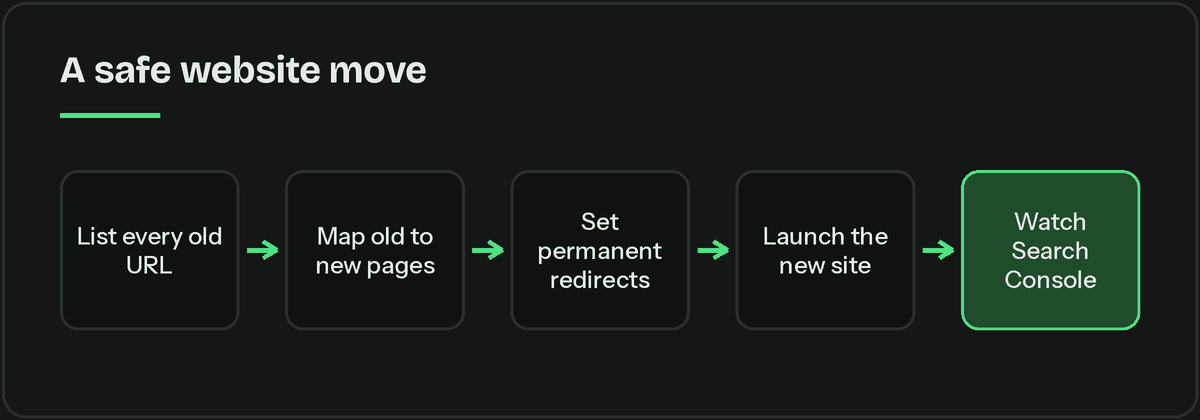
Short answer: To move to a new website without losing rankings, list every important URL on the old site, map each one to its closest page on the new site, set up permanent redirects, keep or improve the content on pages that already rank, test everything on a staging site before launch and monitor Search Console closely for several weeks afterward. Most ranking losses after a redesign come from missing redirects and removed content.
A new website is exciting. It usually means a fresher look, better mobile experience and easier editing. But many businesses discover after launch that calls have dropped because the pages Google used to send people to no longer exist. The new site might be better in every visible way and still lose traffic, simply because the move was not planned with search in mind.
This guide covers the steps that protect your rankings when you redesign, change platforms or move to a new domain.
Why migrations go wrong
Search engines have spent time learning your old site: which pages exist, what each one is about and which other websites link to them. A migration can break that understanding in several ways.
- URLs change without redirects, so visitors and search engines land on error pages.
- Content is removed or shortened, so pages that ranked for specific services no longer cover them.
- Pages are merged carelessly, so specific service or location pages disappear into general ones.
- Technical settings are wrong at launch, such as a leftover noindex setting from the staging site.
- Internal links point to old URLs, creating chains of redirects or broken links.
Before you build: take inventory
List every URL that matters
Export a list of URLs from your current sitemap, your analytics and Google Search Console. Pay special attention to pages that receive search traffic, pages that bring in leads and pages with links from other websites.
Record current performance
Save a snapshot of key data before anything changes: top pages by traffic, top search queries from Search Console and the number of leads you receive in a typical period. You will need this to judge the results afterward.
Note what each page ranks for
For your most valuable pages, note the main queries they appear for. When you rewrite content, make sure those topics are still covered.
During the build: protect what works
Keep URLs where you can
The safest migration keeps the same URLs. If the old structure is reasonable, use it on the new site.
Create a redirect map
For every old URL that will change, decide where it should go. Each old page should redirect to the most relevant new page, not simply to the homepage. Record this in a spreadsheet with old and new addresses side by side.
Carry content forward
Design can change freely, but the substance of pages that already rank should be kept or improved. If a service page ranked well with detailed answers, the new version should have at least the same depth.
Keep titles, descriptions and schema
Transfer title tags, meta descriptions and structured data to the new pages, changing them only where there is a clear improvement.
Before launch: test on staging
Build the new site on a staging address that search engines cannot index, then test thoroughly.
- Check that every redirect in your map works and lands on the right page.
- Click through the main navigation and footer to confirm there are no broken links.
- Submit test entries on every form and confirm they arrive.
- Confirm analytics and conversion tracking are installed.
- Test speed and mobile usability on key pages.
Launch day
- Remove any setting that blocks search engines, such as the WordPress option that discourages indexing.
- Confirm robots.txt allows crawling of the live site.
- Submit the new XML sitemap in Google Search Console.
- Use URL Inspection on your most important pages to request indexing.
- Change the website link on your Google Business Profile if the address changed.
After launch: monitor and fix
Rankings often fluctuate for a short period after a migration, even when everything is done well. What matters is the trend over the following weeks.
- Watch the page indexing report in Search Console for spikes in not found errors.
- Compare traffic and leads with your saved snapshot.
- Fix any missed redirects as soon as you find them.
- Keep the old redirects in place permanently.
Our website redesign checklist includes many of these steps in a format you can print and work through with your designer. If you would rather have a team handle the move, our website development service plans migrations with SEO built in.
Who should own each task
Migrations go more smoothly when everyone knows their part. The designer or developer usually handles the build, redirects and staging site. The business owner should confirm which services and pages matter most, review the new content for accuracy and test the forms personally. Whoever manages SEO should own the URL inventory, the redirect map and the monitoring after launch. Write these responsibilities down before work begins so nothing falls between the cracks.
Frequently asked questions
Is a short drop in rankings after a redesign normal?
A small, short fluctuation is common while search engines process changes. A large or lasting drop usually points to missing redirects, removed content or a technical setting that blocks indexing.
How long should redirects stay in place?
Permanently, if possible. Links from other websites and old bookmarks may keep using the old addresses for years.
Should we change domains at the same time as a redesign?
It is safer to change one thing at a time. If both must happen together, plan the redirects even more carefully and monitor closely.
Next step
Planning a new website? Request a free audit before you start and we will identify the pages and signals your migration needs to protect.
Work with a local team: Spokane SEO, Spokane Valley SEO and a free SEO audit from an SEO company in Spokane.