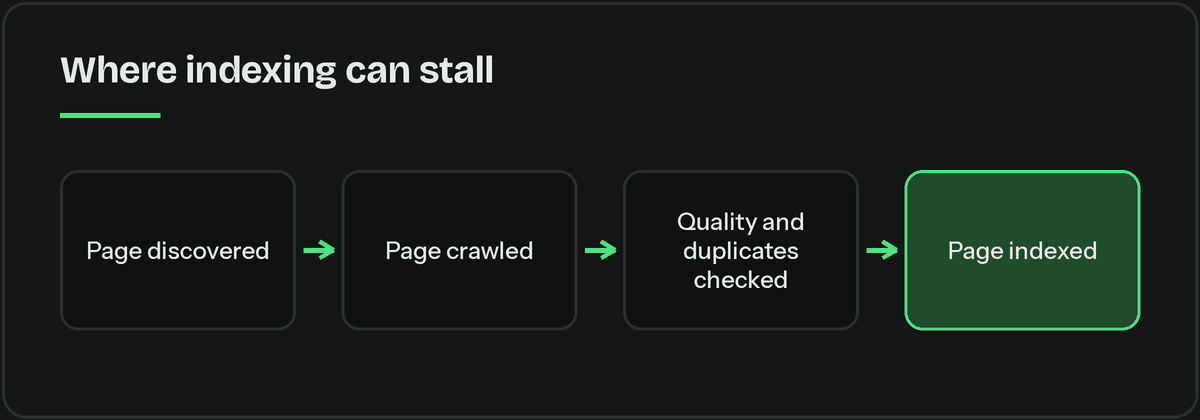
Short answer: Google usually leaves a page out of its index for one of a few reasons: the page is blocked by a noindex tag or robots.txt, it is a duplicate of another page, it has not been discovered yet, or Google crawled it and decided it was not valuable enough to include. The page indexing report in Google Search Console tells you which reason applies, and the fix depends on that reason.
A page that is not in Google’s index cannot appear in search results, no matter how good it is. For a local business, that might mean a new service page, a location page or a helpful blog post that never gets a chance to bring in customers. The good news is that Google is fairly transparent about why pages are excluded, if you know where to look.
This guide explains how to find indexing problems, what the most common statuses mean and what to do about each.
Start with Search Console
Google Search Console is free and is the only place that shows how Google itself sees your pages. If you have not set it up yet, our technical SEO checklist covers the basics.
Two parts of Search Console matter most here.
- The page indexing report lists pages that are indexed and pages that are not, grouped by reason.
- The URL Inspection tool lets you check one specific page, see whether it is indexed, view the canonical Google selected and request indexing after a fix.
Common reasons pages are not indexed
Excluded by noindex tag
The page has a noindex instruction, which tells Google not to include it. Sometimes this is intentional, such as on thank you pages. Sometimes it is a mistake left over from development, or a setting in your SEO plugin applied to a whole content type. Check the page settings in your SEO plugin and the WordPress reading setting that discourages search engines from indexing the site.
Blocked by robots.txt
Your robots.txt file tells crawlers which parts of the site they may visit. If an important folder is blocked, Google cannot crawl the pages inside it. Review the file for rules that block more than you intended.
Duplicate without user selected canonical
Google found several pages with the same or very similar content and chose one to index. This is common with tracking parameters and is often harmless. If an important page appears here, check its canonical tag and whether it is too similar to another page.
Discovered but not indexed
Google knows the page exists but has not crawled it yet. This often happens with new sites, new pages with few internal links, or sites where Google is not convinced crawling more pages is worthwhile. Adding internal links from strong pages and improving overall site quality usually helps.
Crawled but not indexed
Google visited the page and decided not to include it, at least for now. This is usually a quality signal. The page may be thin, very similar to other pages or not clearly useful. The fix is to improve the content, combine it with a related page or remove it if it does not serve a purpose.
Page with redirect or not found
These are usually old URLs. Redirected pages are expected to drop out of the index. Pages returning not found should either be redirected to a relevant page or left alone if they no longer have any value.
What to do first
Not every excluded page is a problem. Many sites have plenty of excluded URLs that should be excluded, such as tag archives, attachment pages and tracking variations. Focus on the pages that matter for your business.
- List your important pages: homepage, each service page, each location page and your best blog posts.
- Check each one with the URL Inspection tool.
- For any that are not indexed, read the reason and apply the matching fix.
- Request indexing after you make a meaningful change.
How to help Google index important pages
Link to them from your own site
Pages that are linked from your main navigation, homepage or related service pages are discovered and crawled more readily. A page that nothing links to is called an orphan page, and orphans are often ignored.
Keep the sitemap clean
Your XML sitemap should list only the pages you want indexed. Submit it in Search Console and make sure it does not include redirected, noindexed or duplicate URLs.
Make each page genuinely useful
Google is selective. A location page that only swaps the city name, or a blog post that repeats what ten other posts say, may never be indexed. Pages that answer real questions with specific, local detail stand a much better chance.
Fix site wide quality issues
If many pages are crawled but not indexed, look at the site as a whole. Large numbers of thin pages can lower how much attention Google gives the rest of the site.
If you have tried the basics and important pages are still missing, a technical SEO audit can uncover crawl and quality issues that are harder to spot.
Frequently asked questions
How long does it take Google to index a new page?
It varies from a few days to several weeks, depending on how often Google crawls your site and how well the page is linked. Requesting indexing in Search Console can speed up the first crawl but does not guarantee inclusion.
Does requesting indexing many times help?
No. One request after a meaningful change is enough. Repeated requests for the same unchanged page do not improve the outcome.
Should every page on our site be indexed?
No. Thank you pages, login pages, internal search results and thin archive pages are usually better left out. The goal is to have your useful pages indexed, not every URL.
Next step
Not sure why some of your pages are missing from Google? Request a free audit and we will check your indexing report and show you what to fix first.
Work with a local team: Spokane SEO, Spokane Valley SEO and a free SEO audit from an SEO company in Spokane.